Trending Doodle — ChatGPT Viral Prompt Photo Editing
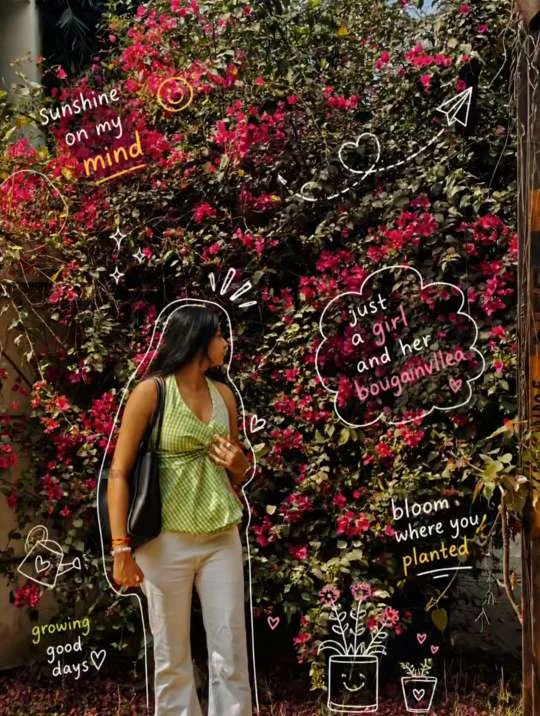
Doodle edits succeed when lines respect form: they ride cheek contours, echo hair flow, and vary stroke width with depth. Random stickers floating in space read as clip art; contour-aware doodles read as bespoke art direction even when the execution is fast.
Plan three doodle layers
Layer one traces major silhouette edges (jaw, hair outer line, shoulders). Layer two adds internal rhythm lines that follow fabric folds. Layer three places symbolic icons (stars, arrows, tiny mascots) with a rule: each icon must anchor to a real point on the subject or environment, not mid-air beside the ear unless it carries motion context.
Palette discipline
Limit doodle colors to two primaries plus black ink. Pastel fills can halo aggressively on compression; prefer solid fills with a single multiply shadow tone if you need depth. Tell ChatGPT the exact palette so your carousel variants stay on-brand.
Copy-ready ChatGPT prompt
Animation tip
If you animate doodles, pick two lines to move on 2s or 3s frame holds; full-frame wiggle chaos reduces perceived quality. Sound design with pencil scratches or soft clicks sells the craft without needing licensed music.